System.out.printf
Display formatted data
The first argument - a format string that describes the output format. Conversion characters are followed.
Insert an integer representing the field width
between the % and the conversion character in the format specifier.
For example,
public class Tester
{
	public static void main(String [] args)
	{
		System.out.printf("%10s\n%5d%5d\n","1234567890",1,23);
	}
}
Output is
To use precision, place between the
percent sign and the conversion specifier a decimal point
followed by an integer representing the precision.
public class Tester
{
   public static void main(String [] args)
   {
	int numOfUnits = 13;
	double unitPrice = 1.99;
	double total = unitPrice * numOfUnits;
	System.out.printf("%50s\n", "12345678901234567890123456789012345678901234567890");
	System.out.printf("%20s%15s%15s\n","Number of Units","Unit Price","Total");
	System.out.printf("%20d%15.2f%15.2f\n",numOfUnits, unitPrice, total);
	System.out.printf("The total is %f.\n", total);
	System.out.printf("The total is %.2f.\n", total);
   }
}
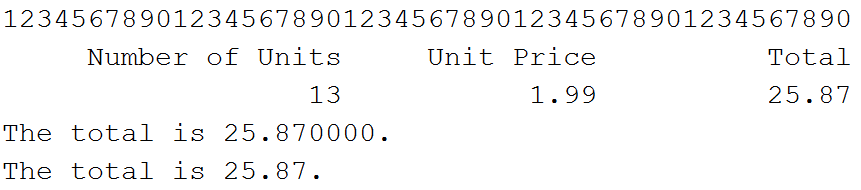
Output is shown below:
Double quote character:
System.out.println("\"Hello World!\"");
display "Hello World!"